01. 3 Keajaiban
02. Hitamku
03. Kepayang
04. Main Hati
06. Muak
07. Sahabat
10. Tak Ada Yang BisaDownload All
01. 3 Keajaiban
02. Hitamku
03. Kepayang
04. Main Hati
06. Muak
07. Sahabat
10. Tak Ada Yang Bisa
Kaspersky® Internet Security 7.0 provides you with the same proven anti-virus protection as Kaspersky Anti-Virus together with additional features including Parental Control, a personal firewall, an anti-spam filter, Privacy Control and more.

Besides, Gigaget fundamentally reduces the operational cost of content providers, while dramatically improving downloading effectiveness and reach. Net Grid Technology taps the unused resources of networked PCs and servers, allowing content providers to deliver large files with faster speed and at a fraction of the cost of traditional solutions.
Free and safe
• 100% free
• No adware or spyware
• No registration required
• Data transfer encrypted
Easy to use and manage
• Simple and advance mode, fit for both rookies and advanced users.
• Powerful Task Manager, easy to organize downloaded files
More than fast
• Ultra-fast download speed experience
• Auto data integrity validation and correction
• Import/export download list, easy to share with friends
Multi file formats and browsers Support
• Compatiable with major browsers-Internet Explorer, Mozilla/Firefox, Maxthon
• Major streaming protocol support, including MMS/RTSP/Flash
• Intelligent Web Analysis, helping you find the URL (out of a web page) to download
Advanced Intelligent Functions
• Intelligent Disk Cache system which protects your hard disk from high-speed download.
• Intelligent Prompt System, providing useful information and suggestions for each specific
situation.
• Unique Error Diagnosis function, helping users find the reasons and solutions on failed
tasks.

It has several 'Modes', each one for performing a different task:
ImgBurn supports a wide range of image file formats - including BIN, CUE, DI, DVD, GI, IMG, ISO, MDS, NRG and PDI.
It can burn Audio CD's from any file type supported via DirectShow / ACM - including AAC, APE, FLAC, M4A, MP3, MP4, MPC, OGG, PCM, WAV, WMA and WV.
It supports Unicode folder/file names, so you shouldn't run in to any problems if you're using an international character set.
ImgBurn supports all the Windows OS's - Windows 95, 98, Me, NT4, 2000, XP, 2003, Vista and 2008 (including all the 64-bit versions). If you use Wine, it should also run on Linux and other x86-based Unixes.
It's a very flexible application with several advanced features that are often lacking in other tools, especially when it comes to burning DVD Video discs. It supports all the latest drives without the need for updates (including booktype / bitsetting / advanced settings on many of the major ones - i.e. BenQ, LiteOn, LG, NEC, Plextor, Samsung, Sony).
There is an image queue system for when you're burning several images (which you can automatically share between multiple drives if you have more than one) and an easy-to-use layer break selection screen for double layer DVD Video jobs. The Automatic Write Speed feature allows you store your favourite burn speed settings on a per 'Media ID' basis, right down to a drive by drive level. Data captured during the burn (write speed, buffer levels etc) can be displayed / analysed using DVDInfoPro.
DownloadOrbit Downloader, leader of download manager revolution, is devoted to new generation web (web2.0) downloading, such as video/music/files from Myspace, YouTube, Imeem, Pandora, Rapidshare. And to make general downloading easier and faster.

GreenBrowser is your best choice of easy and powerful web browse software!
GreenBrowser is free to download and use. If you think our software are good! It's welcome for you to donate. We will provide best support for donative user and make the software better! Thanks for your support!
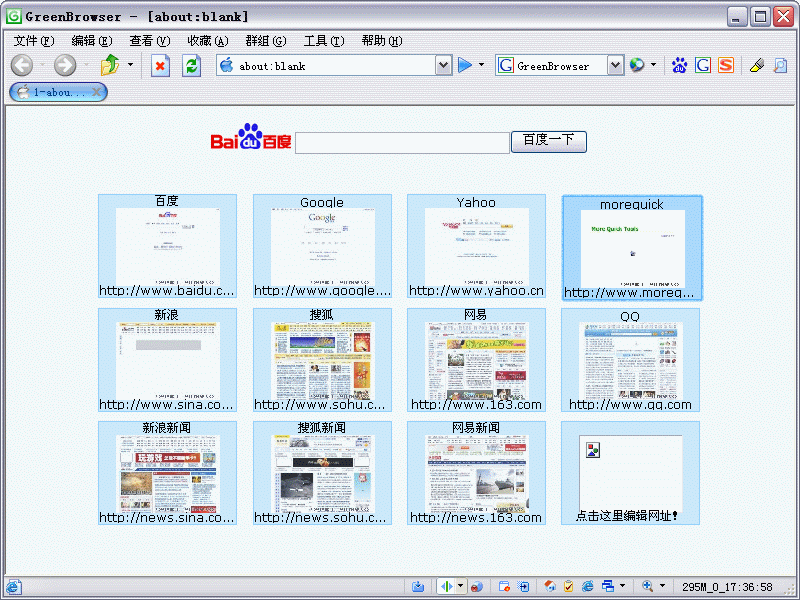
 AD Filter, Mouse Gesture, Mouse Drag, Auto Fill Form, Auto Scroll, Auto Refresh, Auto Save, Auto Hide, Search Bar, External Toolbar, Collector, Page Manager, Download Manager, Group, Plugin, Skin, Proxy, Start Mode, URL Alias, Quick Key, Link List, Status Bar Setting, Sort Save Page, Clean System, Page Download Control, Page Zoom, Page Background Color...
-------------------------------------------------------------------------------------------------------------------------
 Search Engine
You can search direct by drag text in browser. The other way, you also can add special search button to search bar, for example: news, software, image, BT, dictionary, MP3, click the search button will begin search, no use to switch search engine in pop menu. The best and speedy way is direct drag drop text on search button.

There are 15 search buttons in the search bar image: Baidu,Google,Yahoo,GreenBrowser Search,163 Search, MSN Search,Google Feeling Lucky, Baidu Know, Baidu News,Google Image,BT Search,MP3 Search,Software Search,Shopping Search. If you like powerful search bar, click here to download and uncompress to GreenBrowser's user folder.
-------------------------------------------------------------------------------------------------------------------------
External Toolbar
You can add some frequently use programs link in external toolbar by "Set External Toolbar...". After That you can set the program "Auto Start with GreenBrowser" or "Auto Close with GreenBrowser".

-------------------------------------------------------------------------------------------------------------------------
Tab Bar
Tab bar icon show the state of page: blank page? finish download? read or not? locked? protected? saved?

